
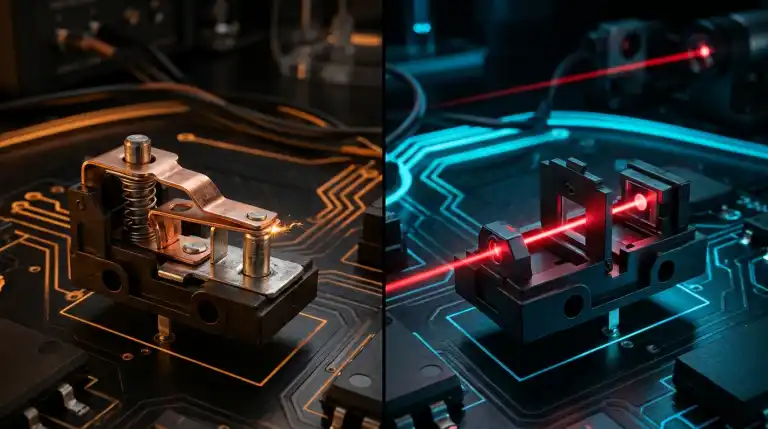
Compare optical vs mechanical mouse switches in gaming. Discover how infrared beams eliminate debounce delay and double clicking for maximum durability.
In competitive PC gaming, the difference between a triumphant victory and a bitter defeat frequently comes down to fractions of a millisecond. You spot an enemy player peeking around a corner. Your brain commands your finger to press the mouse button immediately. Yet your hardware introduces subtle physical delays. These delays occur before registering your shot. To eliminate every microsecond of input lag, peripheral engineers created optical mouse switches. This breakthrough transformed gaming mice. It sparked an intense debate with traditional mechanical micro-switches.
Test Your Mouse Click Speed and Latency:
Check your switch debounce response, button reliability, and CPS sprint in real time using our free Online Mouse Test and Double Click Detector.
For more than three decades, every computer mouse in the world relied on mechanical micro-switches featuring flexible metal leaf springs. Today, flagship esports mice from brands like Razer, Logitech, and Roccat proudly boast optical actuation technology. But does replacing metal contact pins with infrared beams genuinely give you a competitive edge? Or do traditional mechanical switches still offer superior tactile feedback and energy efficiency? In this comprehensive technical guide, we compare optical and mechanical mouse switches across actuation speed, durability, power consumption, and tactile performance.
How Mechanical Mouse Switches Work
Traditional mechanical mouse switches rely on physical electrical contacts. Inside each rectangular switch casing sits a curved metal leaf spring stamped from beryllium copper or phosphor bronze. The spring rests under pre-tension above a stationary terminal. It waits for finger pressure from above.
When you press the mouse button, an external plastic plunger drives downward against the metal leaf spring. Finger pressure exceeds the resistance threshold quickly. The spring snaps downward toward the contact pad. A gold-plated pad on the moving spring hits the stationary pin. This physical contact completes an electrical circuit. This physical contact completes an electrical circuit, allowing current to flow into the mouse microcontroller.
Mechanical switches deliver a satisfying click and crisp feel. However, physical impact introduces engineering compromises. Metal contacts bounce and vibrate upon impact. They take several milliseconds to establish a stable connection. Controllers apply an artificial cooldown called debounce delay. This prevents contact bounce from registering as extra clicks. If you want to understand how switch bounce causes hardware failure over time, read our guide on Why Is My Mouse Double Clicking on Click?.
How Optical Mouse Switches Work
Optical mouse switches discard physical electrical contacts entirely. Instead of relying on metal-on-metal collision to close a circuit, optical switches use the speed of light to register keystrokes and button clicks.
Inside an optical switch, two components face each other. An infrared LED transmitter pairs with a photodiode receiver. When the button is unpressed, a plastic shutter blocks the beam. It keeps the infrared light from reaching the sensor.
Optical Switch Cross-Section:
[Infrared LED] ---> | Shutter Blade | ---> [Photodiode Sensor] (Circuit Open)
When button clicked:
[Infrared LED] ==========================> [Photodiode Sensor] (Instant Signal)
(Shutter drops, light strikes photodiode at light speed with zero bounce)
When you depress the mouse button, the internal shutter moves downward out of the light path. The infrared beam instantly strikes the photodetector. The photodetector generates an electrical current, signaling an immediate click event to the microcontroller. Releasing the button returns the shutter to its resting position. The light beam is blocked once again.
Speed and Latency: The Debounce Delay Elimination
The most significant competitive advantage of optical mouse switches is the complete elimination of firmware debounce delay. In traditional mechanical switches, the physical metal spring rebounds upon impact. Firmware waits between 4ms and 16ms before confirming clicks. This prevents microscopic bounces from registering as double clicks.
Adding 4 to 12 milliseconds of delay is a disadvantage. In tactical shooters, every microsecond counts. A running enemy covers several pixels in twelve milliseconds. Instant registration ensures your crosshair connects. By contrast, an optical switch produces zero physical contact bounce. Light either strikes the photodetector or it does not. There is no intermediate vibrating state.
Because there is no contact bounce to filter, optical mouse firmware does not require artificial debounce delay timers. The microcontroller registers the input within 0.2 milliseconds of physical actuation. In fast-paced first-person shooters, this near-instantaneous response gives competitive players the absolute fastest click registration technically possible.
Durability and Lifespan: Physical Wear vs Light Beams
Mechanical switches inevitably degrade due to continuous physical friction, metal fatigue, and environmental exposure. Every mechanical click creates microscopic electrical sparks. These micro-arcs burn tiny craters into the metal surface. Furthermore, ambient humidity and oxygen cause surface oxidation, increasing contact resistance over time.
Most standard mechanical mouse switches are rated for 20 million to 50 million clicks before failure. Many mechanical mice develop double clicking within two years. The metal spring fatigues and bounces past debounce thresholds. The metal spring loses its elasticity, vibration duration increases, and the switch begins double clicking.
Optical switches solve this longevity problem. Because the electrical signal is generated by an infrared beam, the moving shutter blade never strikes electrical contacts. There is no electrical arcing, no contact wear, and no metal oxidation. Optical switches are commonly rated for 70 million to 100 million clicks. More importantly, optical switches are physically incapable of developing mechanical double clicking. Even if the internal return spring weakens over five years of continuous use, the switch will never double click.
Tactile Feedback and Acoustic Crispness
If optical switches are faster and more durable, why do many competitive gamers and keyboard enthusiasts still prefer traditional mechanical switches? The answer lies in tactile feedback and acoustic profile.
In mechanical switches, the click sound and tactile bump happen together. The metal spring snaps directly against the contact terminal. Because the click sound, tactile resistance drop, and electrical actuation happen at the exact same physical point, mechanical switches offer unparalleled tactile precision. Gamers can feel the exact moment the command registers through their fingertip.
Early optical mouse switches (such as first-generation Razer opticals) relied on an auxiliary metal clicker spring purely to provide tactile feedback and sound, while the optical shutter actuated independently. Early optical designs felt somewhat hollow. Some gamers felt the tactile bump was disconnected from actuation. Some players reported feeling actuation before hearing the click sound. Modern third-generation optical switches have largely closed this tactile gap by refining leaf spring geometry, but purists still favor the crisp, metallic snap of enthusiast mechanical switches like the Kailh GM 8.0 or Huano Blue Shell Pink Dot.
Battery Life Considerations in Wireless Mice
While optical switches dominate wired esports peripherals, they introduce a distinct engineering challenge in ultra-lightweight wireless mice: electrical power consumption.
A mechanical switch is a passive electrical component. When the switch is open, it consumes zero milliwatts of electrical power. The circuit remains completely unpowered until your finger physically bridges the contacts. By contrast, an optical switch requires an active infrared LED that constantly emits light to detect shutter movements.
Powering two or five continuous infrared LEDs places additional drain on miniature rechargeable lithium-ion batteries. Powering active optical switches reduces battery runtime by 15% to 30%. In ultra-light mice, passive mechanical switches conserve energy. Manufacturers mitigate this by pulsing the infrared LEDs or placing them into low-power sleep modes when the mouse remains stationary. To understand wireless signal stability and battery constraints, read our guide on Why Bluetooth Audio Cuts Out When Walking.
Optical vs Mechanical Switches: Technical Comparison.
| Feature Parameter. | Mechanical Switches. | Optical Switches. |
|---|---|---|
| Actuation Mechanism. | Physical metal contacts touching. | Infrared light beam interruption. |
| Debounce Delay Required. | Yes (Typically 4ms to 16ms). | No (Zero debounce delay, 0.2ms). |
| Double Click Risk. | High (Spring fatigue, oxidation). | Zero (Physically immune to chatter). |
| Rated Click Durability. | 20 Million to 50 Million clicks. | 70 Million to 100 Million clicks. |
| Power Consumption. | Zero passive draw when open. | Requires active infrared LED power. |
| Tactile Crispness. | Sharp, metallic, highly defined. | Smooth and fast, slightly softer. |
The Evolution of Optical Switches: Gen 1 to Gen 3
Optical switch technology in gaming mice has undergone rapid engineering evolution over the past several years. When early optical gaming mice debuted around 2019, players voiced valid criticisms regarding click feel. Early switches prioritized raw electronic speed at the expense of tactile pleasure. Understanding this progression helps explain why modern optical mice dominate current esports tournaments.
First Generation Optical Switches (2019 to 2021)
First generation optical switches focused entirely on proving that infrared actuation could replace mechanical contacts. The primary engineering goal was solving the catastrophic double clicking epidemic that plagued older mechanical flagships. While first generation switches successfully eliminated chatter, they suffered from noticeable drawbacks. The click resistance felt overly light, the travel distance was slightly mushy, and the acoustic snap lacked satisfying bass resonance. Some players complained that resting a finger heavily on the button could cause accidental misfires during tense combat rounds.
Second Generation Optical Switches (2021 to 2023)
Peripheral engineers responded to community feedback by redesigning the internal clicker leaf spring. Second generation switches introduced stiffer spring alloys and refined housing tolerances. These revisions produced a crisper, more tactile acoustic click that closely mimicked high-end mechanical Omron switches. Furthermore, manufacturers tweaked the actuation travel distance from 0.6mm down to 0.5mm, improving rapid tap consistency without compromising safety margins.
Third Generation and Hybrid Optical Switches (2023 to Present)
Modern third generation optical switches represent the pinnacle of peripheral actuation engineering. Brands like Razer (Gen 3 Optical) and Logitech (Lightforce Hybrid) introduced hybrid architectures. These modern switches combine the blistering speed of infrared light beams with the tactile satisfaction of authentic mechanical leaf springs. Logitech Lightforce switches, for instance, utilize a mechanical contact block specifically to produce authentic tactile clicks while routing the electrical trigger through an optical sensor. This hybrid approach delivers the best of both worlds: uncompromised tactile precision paired with zero debounce latency.
Esports Benchmarks: Do Milliseconds Truly Matter?
Skeptics often question whether saving 4 to 12 milliseconds of debounce latency creates a noticeable difference in competitive gameplay. To understand this impact, you must analyze the complete human-to-computer reaction pipeline.
The average human visual reaction time to an unexpected on-screen stimulus ranges from 180 to 240 milliseconds. Professional esports athletes train their reflexes to achieve reaction times between 130 and 160 milliseconds. While saving 8 milliseconds represents a modest percentage of total human reaction time, it represents a massive slice of hardware latency.
Consider a 240Hz or 360Hz esports monitor. At 360Hz, a new visual frame renders every 2.77 milliseconds. If your mechanical mouse applies a conservative 8-millisecond debounce delay, your input is delayed by nearly three full monitor refreshes. In high-stakes tactical shooters like Counter-Strike 2 or Valorant, an enemy moving at full strafe speed crosses several virtual hitbox pixels during those three frames. In split-second sniper duels where both players fire simultaneously, the player whose hardware registers 8 milliseconds faster lands the fatal hit first.
Which Switch Type Should You Choose?
Choosing between optical and mechanical switches depends on your competitive priorities and gaming habits.
You should choose optical mouse switches if:
- You play fast-paced competitive esports titles like Valorant, Counter-Strike 2, or Apex Legends where minimum input latency is critical.
- You have owned mechanical mice in the past that developed annoying double click defects within two years.
- You want maximum hardware durability without ever needing to desolder components or spray contact cleaners.
You should choose mechanical mouse switches if:
- You prioritize maximum wireless battery endurance that lasts several weeks between charges.
- You demand the crispest, most tactile acoustic snap possible with distinct feedback under your fingertips.
- You enjoy custom peripheral modding and want the ability to solder different aftermarket switches into your mouse.
FAQs
Can you replace mechanical mouse switches with optical switches?.
No. Mechanical and optical switches require completely different circuit board layouts. Mechanical switches solder into standard through-hole pin pads connected to copper traces. Optical switches require surface-mounted infrared emitter diodes and optical sensors on the PCB. You cannot install optical switches into a mechanical mouse.
Do optical switches make you aim better in games?.
Optical switches will not improve raw hand-eye coordination. However, they eliminate 4 to 12 milliseconds of debounce delay. This ensures your shots register the exact millisecond you click, giving you a measurable speed advantage in split-second sniper duels.
Are optical mouse switches louder than mechanical switches?.
No. Acoustic volume depends on the internal plastic casing and the clicker leaf spring design. Both optical and mechanical gaming switches produce distinct click sounds. Some modern optical switches sound slightly deeper and less metallic than traditional Omron mechanical switches.
Do optical switches suffer from sensor wear over time?.
Infrared LEDs and photodiodes are solid-state semiconductor components with operational lifespans exceeding fifty thousand continuous hours. Long before an optical LED degrades, the external plastic mouse shell or internal battery will reach end-of-life.
Key Takeaways:
- Mechanical mouse switches use physical metal leaf springs that bounce upon impact, requiring firmware debounce timers to prevent false double clicks.
- Optical mouse switches use infrared light beams and moving shutter blades, achieving instantaneous click registration without contact bounce.
- Because optical switches have no physical contact bounce, they eliminate 4ms to 16ms of artificial debounce latency in competitive games.
- Optical switches are physically immune to switch chatter, eliminating accidental double clicking for up to 100 million clicks.
- Mechanical switches consume zero passive power, giving wireless gaming mice significantly longer battery life.
- You can test your mouse click response time and detect mechanical bounce in real time with our free online tester.

Abdulrehman Khalid ✓ Verified Author
Founder & Lead Hardware Analyst at TechWorthies
Abdulrehman Khalid is a technology analyst, hardware researcher, and founder of TechWorthies. With extensive hands-on experience in benchmarking computer hardware, display interfaces, and wireless communications, he specializes in high-speed bus architectures, consumer electronics diagnostics, and emerging AI robotics. His technical guides prioritize empirical lab testing, official standards verification (IEEE, VESA, JEDEC), and actionable troubleshooting for hardware enthusiasts.