
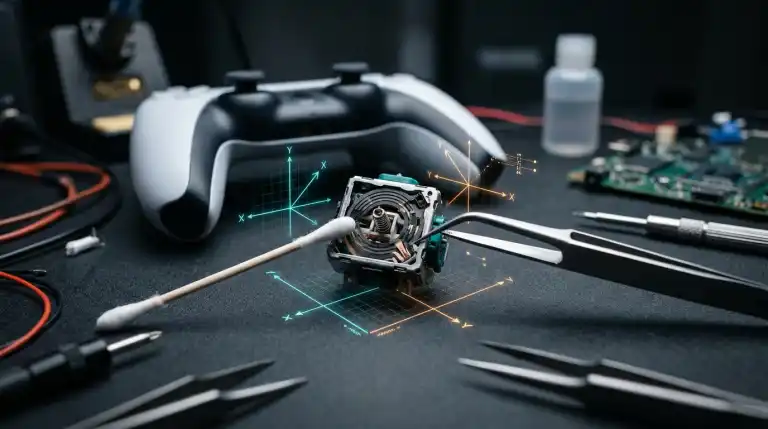
You are positioned in a tense final circle in Warzone or lining up a precision sniper shot in Apex Legends. Your thumbs are steady, resting lightly above the thumbstick caps without applying pressure. Suddenly, your in-game crosshair begins creeping slowly upward toward the sky. In adventure games, your character walks unprompted off high ledges. This frustrates players during critical moments. This infuriating hardware defect is known as analog stick drift, and it affects modern game controllers across PlayStation 5, Xbox Series X, Nintendo Switch, and PC platforms.
Measure Your Stick Drift Coordinates Live:
Test your controller analog stick centering, deadzone deviation, and circularity error right now using our free Gamepad and Controller Stick Drift Tester.
Stick drift is not an imaginary glitch or a minor software calibration bug. It is a predictable physical consequence of the electromechanical joystick modules used inside modern gamepads. Manufacturers face lawsuits over joystick drift. Yet understanding how sticks work lets you diagnose and fix the issue. You can avoid spending seventy dollars on a new gamepad. In this comprehensive technical guide, we break down why analog sticks drift, how to measure your exact axis deviation, and practical steps to fix the problem quickly.
What Causes Controller Stick Drift?.
Mainstream console controllers use thumbsticks from ALPS Alpine. This includes the Sony DualSense, Xbox Wireless, and Switch Pro gamepads. The outer shells differ ergonomically. Yet the underlying joystick mechanisms are virtually identical across all brands.
An analog joystick module consists of a central plastic pivot shaft cradled inside a metal housing. A centering spring and gimbal sit at the base of the shaft. They return the stick to neutral when released. Two potentiometers sit on adjacent sides of the metal frame. One measures the X-axis while the other tracks the Y-axis. One potentiometer measures horizontal movement along the X-axis (left and right). The second potentiometer measures vertical movement along the Y-axis (up and down).
Potentiometer Internal Mechanism:
[ Terminal 1: Voltage In ]
            |
    [ Carbon Resistive Track ] <=== (Metal Wiper Scrapes Back and Forth)
            |
[ Terminal 2: Ground Out ]  ----> [ Center Wiper Pin: Output Voltage to ADC ]
Inside each potentiometer sits a circular ring. It is coated with a thin layer of conductive carbon film. A three-pronged metal wiper rests directly on the track. It is made of flexible phosphor bronze. Tilting the thumbstick moves the metal wiper. It scrapes back and forth across the carbon surface continuously. This movement alters electrical resistance. It changes the voltage sent to the analog-to-digital converter. The controller converts voltage into numerical coordinates. It tells the console how far you pushed the stick.
Stick drift occurs when the electrical readout fails to return to zero when the stick sits physically centered. This breakdown stems from three distinct physical wear mechanisms:
| Failure Factor. | Physical Root Cause. | Observed Symptom. | Repair Difficulty. |
|---|---|---|---|
| Carbon Track Erosion. | Metal wiper physically grinds carbon powder off track. | Permanent directional bias or sudden jumpy inputs. | Requires sensor cleaning or module replacement. |
| Dust & Debris Contamination. | Dead skin, pet hair, and lint entering ball socket. | Intermittent resistance spikes and random drift spikes. | Easily resolved with solvent cleaning. |
| Spring Fatigue & Neutral Creep. | Internal return spring loses factory pre-tension. | Stick rests 3% to 8% off-center when released. | Easily masked with in-game deadzones. |
ALPS Alpine rates their standard potentiometer joysticks for approximately two million rotational cycles. Active gamers reach two million cycles in four to seven months. Daily play in tactical shooters accelerates mechanical wear. Continuous friction scrapes away carbon film over time. This friction inevitably degrades sensor accuracy.
Step 1: Diagnose Your Exact Drift Vector and Magnitude.
Before attempting any software tweaks or hardware cleaning, you must quantify the exact severity of your drift. Players often mistake loose center springs for ruined tracks. Proper diagnostics identify the true root cause. You can inspect your controller raw telemetry right in your browser using our diagnostic utility.
- Connect your controller to your PC or Mac using a USB-C data cable or Bluetooth.
- Open the Gamepad and Controller Stick Drift Tester in Google Chrome, Microsoft Edge, or Opera.
- Press any face button (such as A, X, or a trigger) to awaken the browser HTML5 Gamepad API.
- Look at the twin radar circles representing your left and right analog sticks. Release your fingers completely from the controller.
- Observe the crosshair position and the numeric coordinate readout. A brand-new, factory-perfect stick will sit within +/- 0.03 of dead center (0.00, 0.00).
- Flick the stick in all four cardinal directions (North, South, East, West) and let it snap back to center. Check where the coordinate settles.
If your coordinate rests between 0.04 and 0.09, your controller has minor spring relaxation that can be completely solved in software within two minutes. If your coordinate sits above 0.15, or if the indicator erratically vibrates and jumps without physical input, your potentiometer has accumulated debris or suffered carbon track wear.
Step 2: Instant Software Fixes (Zero Cost, Zero Tools).
If your stick drift is minor to moderate (under 0.12 deviation), you do not need to take apart your controller. Modern game developers and operating systems provide software deadzone tools specifically to counteract mechanical wear.
1. Adjusting In-Game Inner Deadzones.
A deadzone is a circular virtual boundary around the center of the analog stick. As long as the stick coordinate remains inside this boundary, the game treats the input as zero. Almost all modern competitive shooters, including Call of Duty Warzone, Apex Legends, Fortnite, and Rainbow Six Siege, feature dedicated deadzone sliders in their controller settings.
If your controller drifts to 0.07 on the right stick, your default in-game deadzone of 0.05 is too tight. Increase your Inner Deadzone from 0.05 to 0.08 in settings. This stops unwanted drift immediately. Your crosshair will remain completely steady. Keep deadzones as tight as possible. This preserves quick aiming while eliminating unwanted camera drift.
2. Windows 11 Game Controller Calibration.
If you game on PC, Windows features a built-in calibration utility that can re-center hardware endpoints. Press the Windows key, type joy.cpl, and press Enter to open the Game Controllers window. Select your connected controller, click Properties, navigate to the Settings tab, and click Calibrate. Follow the on-screen wizard to rotate your sticks in full circles. Windows will measure your stick resting point and mathematically recalculate center offsets.
3. Steam Input Deadzone Override.
For PC gamers playing through Steam, the Steam Input configurator provides elite-level deadzone customizability. Open Steam, navigate to Settings > Controller, and click Calibration and Advanced Settings. Steam allows you to visually drag a circular deadzone boundary over a live telemetry plot, creating custom deadzone profiles that apply automatically across all your games.
Step 3: Quick Non-Invasive Cleaning (No Disassembly).
If software adjustments cannot overcome severe drift (above 0.15 deviation), physical contaminants are likely trapped between the metal wiper and the carbon track. Before reaching for screwdrivers, you can perform effective non-invasive cleaning from the outside of the controller.
The Thumbstick Massage Technique.
Often, microscopic plastic shavings from the thumbstick collar get wedged under the wiper arm. Push the thumbstick inward until you feel the L3 or R3 tactile click. Hold the stick firmly clicked down. Rotate it thirty times clockwise, then thirty times counter-clockwise. Pull the stick gently upward until it pops slightly. Repeat the circular rotations to clear debris. This simple mechanical sweep dislodges loose particles resting on the carbon film.
Compressed Air Dust Removal.
Tilt the thumbstick as far to the left as possible. This opens a small crescent-shaped gap between the thumbstick dome and the controller outer shell. Insert the thin plastic straw of a canned compressed air canister into the gap. Deliver three to four short, controlled bursts of air into the housing. Rotate the stick to the opposite side and repeat the process. Avoid holding the can upside down to prevent liquid propellant from spraying onto the circuit board.
Electronic Contact Cleaner Application.
Use fast-drying electronic contact cleaner for non-invasive cleaning. Never use standard multi-purpose lubricant sprays. Electronic cleaner dissolves oil and lifts dust quickly. It evaporates cleanly without leaving residue.
Power off the controller and disconnect all cables. Tilt the thumbstick to expose the internal collar gap. Spray a brief half-second burst of contact cleaner directly into the joystick mechanism. Rotate the stick in circles for forty seconds immediately. This distributes solvent across the internal potentiometer tracks. Allow the controller to dry completely for thirty minutes in a well-ventilated room before powering it on. Re-test your coordinates on our online gamepad tester to verify whether the drift vanished.
Step 4: Advanced Hardware Fix (Opening the Potentiometer).
If non-invasive solvent cleaning fails to resolve severe erratic drift, the carbon track has accumulated compacted carbon sludge or the metal wiper has lost tension. You can perform a targeted hardware refurbishment without soldering by popping open the potentiometer sensor gate.
- Remove the controller outer housing using a plastic pry tool and precision Phillips or Torx security screwdrivers (Torx T8 for Xbox, Phillips #00 for PS5 DualSense).
- Disconnect the internal battery and lift the main printed circuit board to expose the metal joystick modules.
- Locate the rectangular green or orange plastic potentiometer housing mounted on the side of the metal stick frame.
- Pry the top retention clips outward gently. Fold the plastic sensor gate backward at a 45-degree angle. Avoid bending past 60 degrees. Excessive force will crack the plastic hinge.
- Inside the opened gate, you will see a tiny circular metal wiper ring. Carefully remove the wiper using precision tweezers.
- Inspect the curved carbon track on the inner wall. Dip a micro-swab or pointed cotton applicator into 99% isopropyl alcohol and gently wipe away black carbon residue until the track looks clean and glossy.
- Examine the tiny metal wiper prongs. If the prongs are flattened or bent, use tweezers to gently bend them outward slightly to restore mechanical contact tension. Alternatively, insert a fresh replacement wiper salvaged from an inexpensive ALPS potentiometer.
- Snap the plastic potentiometer gate firmly back into its metal locking tabs until it clicks shut.
- Reassemble the controller and verify your telemetry on our browser tester.
The Permanent Solution: Hall Effect Magnetic Joysticks.
While cleaning potentiometers and adjusting software deadzones extends the lifespan of standard controllers, mechanical potentiometers will always remain vulnerable to friction wear. Metal wipers must scrape against carbon film continuously. Therefore, all standard potentiometers eventually develop drift.
To eliminate stick drift permanently, modern gaming peripheral manufacturers have turned to Hall Effect magnetic sensing technology. Hall Effect joysticks replace scraping metal wipers with permanent neodymium magnets and contactless electromagnetic sensors. Moving parts never touch electrical contacts in Hall Effect modules. They produce zero friction wear and resist stick drift completely. To understand the physics and performance of magnetic sensors, read our in-depth comparison on Hall Effect vs Potentiometer Joysticks. Furthermore, if you play competitive games over remote streams, responsive input is critical; learn how network latency impacts gameplay in our breakdown of How Does Cloud Gaming Work?.
FAQs.
Can controller stick drift be fixed without opening the controller?.
Yes. If your stick drift is minor to moderate, you can completely eliminate it by increasing your in-game inner deadzone settings by 3% to 5%. For debris-related drift, spraying fast-drying electronic contact cleaner through the exterior thumbstick collar frequently dissolves grime and restores accurate tracking without opening the shell.
Does rubbing alcohol fix stick drift?.
Yes, provided you use 99% isopropyl alcohol. Isopropyl alcohol at 99% purity contains almost zero water, evaporates rapidly, and dissolves oil and debris on carbon tracks. Avoid standard 70% rubbing alcohol because its 30% water content can corrode internal solder joints and short out controller circuitry.
Why do modern PS5 and Xbox controllers drift faster than older controllers?.
Modern console controllers use higher polling rates and feature tighter factory deadzone calibrations to provide snappy, responsive aim. Because competitive games set default deadzones as low as 5%, even minor spring relaxation or microscopic carbon wear triggers noticeable on-screen drift that would have gone unnoticed on older consoles.
Will increasing deadzones make my aim worse in games?.
Increasing deadzones excessively (above 15%) creates sluggish aiming response because your thumb must travel farther before the game registers movement. However, increasing your deadzone slightly (from 5% to 8%) to match your stick mechanical resting position eliminates drift with virtually zero noticeable impact on your competitive accuracy.
Key Takeaways.
- Controller stick drift is an electromechanical failure caused by metal wipers scraping carbon film tracks inside ALPS potentiometer modules.
- Continuous friction wears away conductive carbon powder, creating dead spots and erratic resistance spikes that register as phantom movement.
- Minor stick drift (under 0.10 coordinate deviation) can be resolved in two minutes by raising in-game inner deadzone sliders in games like Warzone and Apex Legends.
- Non-invasive cleaning using canned compressed air and fast-drying electronic contact cleaner resolves debris-related drift without opening the controller.
- Advanced hardware refurbishment involves gently prying open the potentiometer sensor gate to clean carbon tracks with 99% isopropyl alcohol and re-tensioning wiper prongs.
- You can monitor your stick centering accuracy, axis drift coordinates, and circularity error in real time using our free interactive gamepad tester.

Abdulrehman Khalid ✓ Verified Author
Founder & Lead Hardware Analyst at TechWorthies
Abdulrehman Khalid is a technology analyst, hardware researcher, and founder of TechWorthies. With extensive hands-on experience in benchmarking computer hardware, display interfaces, and wireless communications, he specializes in high-speed bus architectures, consumer electronics diagnostics, and emerging AI robotics. His technical guides prioritize empirical lab testing, official standards verification (IEEE, VESA, JEDEC), and actionable troubleshooting for hardware enthusiasts.