
Connect any USB or Bluetooth gamepad to inspect analog stick centering, deadzone drift, trigger pressure, and button responsiveness.
Key Takeaways
- Real-Time Stick Radar: Visualizes left and right analog stick positioning with four decimal places of accuracy.
- Deadzone Accuracy Rings: 5% inner deadzone and 15% outer deadzone reference rings highlight stick drift instantly.
- Analog Trigger Telemetry: Measures LT/L2 and RT/R2 trigger pull depth smoothly from 0.00 to 1.00.
- Universal W3C Controller Compatibility: Works with Xbox Wireless, PlayStation DualSense, DualShock 4, and generic PC controllers.
What Causes Gamepad Stick Drift?
Gamepad stick drift occurs when an analog stick registers movement even while your thumbs are off the controller. In popular games, this causes your character to walk slowly or your camera to pan uncontrollably. Stick drift stems from potentiometer wear inside the joystick module.
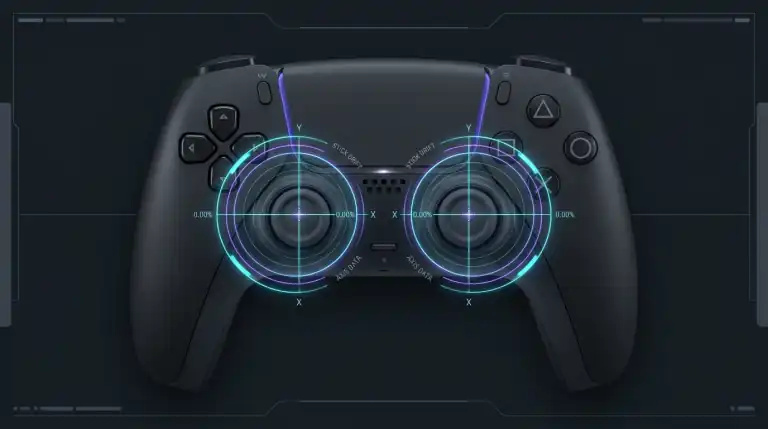
Standard joysticks use two rotary potentiometers. Each potentiometer contains a wiper arm that rubs against a resistive carbon track. Over hundreds of gaming hours, this rubbing scrapes off carbon dust and wears the surface unevenly. The wiper arm loses consistent contact, causing voltage spikes that your console interprets as physical movement.
Hall Effect joysticks solve drift permanently. Instead of physical carbon tracks, Hall Effect sensors use tiny magnets and contactless magnetic sensors. Because there is zero physical friction, Hall Effect sticks never develop mechanical drift.
Interpreting Deadzones and Deviation Percentages
Deadzones define an intentional neutral area around the center of your thumbstick where movement input is ignored:
- Under 5% Deviation (Excellent): Thumbstick centers perfectly. Suitable for competitive tactical shooters with minimal in-game deadzones.
- 5% to 10% Deviation (Normal): Standard wear for traditional carbon potentiometers. Most games absorb this deviation within default deadzones.
- Over 15% Deviation (Drift Failure): Noticeable in-game drift. The controller requires calibration, deadzone increases, or sensor module replacement.
If your controller disconnects periodically while playing on PC, check your USB power delivery settings. Read our guide to stop Windows 11 from turning off USB ports.
How to Connect and Test Your Controller
Testing your controller requires no extra drivers:
- Connect your controller to your PC using a USB cable or Bluetooth.
- Press any button on the controller to wake up the browser Gamepad API.
- Rotate both analog sticks in full 360-degree circles to test circularity and spring return.
- Release the sticks and check the Stick Radar HUD above for resting position coordinates.
- Press analog triggers (LT and RT) to confirm smooth 0.00 to 1.00 linear response.
- Press all face buttons, bumpers, and D-pad directions to verify button contacts.
More Free Hardware Diagnostic Tools
Test your complete gaming and workstation hardware setup with our suite of free online browser tools:
FAQs
Why does my controller not show up on the test tool?
The W3C Gamepad API remains idle for privacy reasons until you press a physical button on the connected controller. Ensure your controller is paired via Bluetooth or plugged in via USB, then press the A, X, or guide button to activate reporting.
Can stick drift be fixed without opening the controller?
Minor drift caused by dust or carbon debris can sometimes be resolved using compressed air or quick-drying electronic contact cleaner sprayed into the ball joint. Software deadzone adjustments in game settings can also mask minor drift up to 10%.
Are Hall Effect controllers really immune to drift?
Hall Effect sensors are completely immune to electrical track wear because they detect magnetic flux rather than friction. However, mechanical return springs can still weaken over years of abuse, leading to slight physical off-centering.
Where can I test my mouse and keyboard?
Test your mouse click speed and debounce chatter on our Mouse Test page. You can also test keyboard rollover on our Keyboard Ghosting Test.