
Learn why your mouse double clicks on a single click. Understand micro-switch chatter, test debounce times online, and explore effective hardware fixes.
Few computer hardware malfunctions are as maddening as a mouse that registers an unwanted double click when you click once. You try to select a single paragraph in a document, but the computer highlights the entire page. You attempt to drag an icon across your desktop, only for the file to drop prematurely into an unintended folder. In fast-paced competitive games, this defect becomes catastrophic. A single tap to aim down sights can instantly toggle on and off, or a single rifle tap can discharge two rounds, wasting valuable ammunition. This widespread hardware failure is known as switch chatter or mouse double clicking.
Test Your Mouse Switches in Real Time:
Determine if your mouse suffers from mechanical switch chatter or bouncing right now using our free Online Mouse Test and Double Click Detector.
Many users assume this frustrating glitch is caused by Windows mouse driver corruption, dirt under the outer plastic shell, or malicious software. In reality, double clicking is an electro-mechanical failure. It occurs inside the micro-switch soldered to the mouse circuit board. In this comprehensive technical guide, we examine the physics behind switch chatter, why premium gaming mice suddenly develop this fault, and how you can diagnose and fix the issue.
The Anatomy of a Computer Mouse Micro-Switch
Every standard mechanical computer mouse relies on miniature snap-action switches positioned beneath the primary left and right buttons. The most common components used across the gaming industry are manufactured by brands like Omron, Kailh, Huano, and TTC. Regardless of brand, almost all traditional mechanical mouse switches share the exact same internal mechanical architecture.
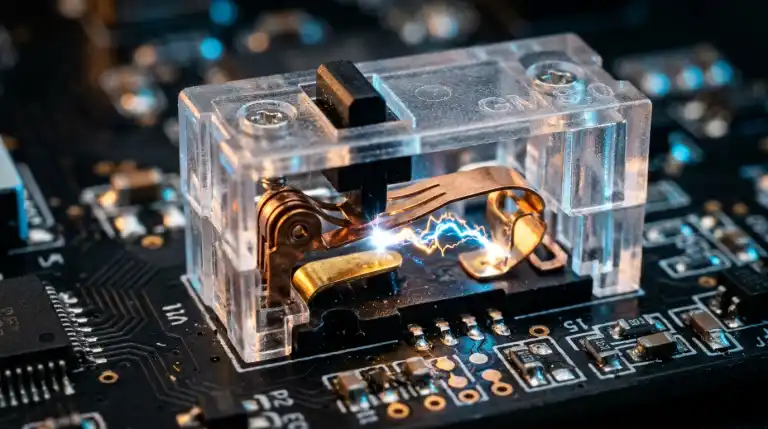
Inside the plastic switch housing sits a miniature curved leaf spring. It is stamped from beryllium copper or phosphor bronze. This metal spring is anchored to an electrical terminal at one end and suspended under mechanical tension. When your finger depresses the external mouse button, an internal plastic plunger pushes downward against the center of the metal spring. Exerting enough force overcomes the spring pre-tension threshold. The spring snaps downward into an electrical contact point with a click.
| Switch Component. | Material Used. | Primary Functional Role. | Failure Mode. |
|---|---|---|---|
| Moving Leaf Spring. | Beryllium copper alloy. | Provides tactile snap and mechanical return. | Metal fatigue and loss of spring tension. |
| Electrical Contact Pad. | Silver or gold alloy plating. | Completes electrical circuit to signal click. | Surface oxidation, pitting, and carbon build-up. |
| Actuator Plunger. | Molded POM or nylon plastic. | Transfers finger force to internal spring. | Groove wear from millions of button presses. |
When the moving contact pad slams against the stationary contact pin, the electrical circuit closes. Current flows through the switch into the mouse microcontroller. The microcontroller reads the voltage drop. It then transmits a click data packet over the USB cable to Windows.
The Physics of Contact Bounce and Switch Chatter
To understand why a mouse double clicks, you must observe what happens at the microscopic level during that sudden snap action. Dropping a rubber ball onto concrete does not stop it immediately. Instead, the ball bounces several times before coming to rest. It rebounds and bounces multiple times before settling completely.
The exact same mechanical phenomenon occurs inside every mechanical switch. When you click your mouse, the leaf spring does not stay still. The metal spring strikes the contact pad with substantial kinetic energy. It strikes the stationary pad with noticeable kinetic force. It bounces off the contact pad repeatedly. It vibrates for several milliseconds before establishing a solid physical connection.
Voltage Oscilloscope View of a Mechanical Mouse Click:
5V | ---                /---\      /---\
   |    \              /     \    /     \
0V |     \------------/       \--/       \=================
      [Initial Strike] [Bounce 1] [Bounce 2] [Stable Closed State]
      |<----------- Contact Bounce Window (2ms to 15ms) ---------->|
This microscopic rebound behavior is known as contact bounce. An electronic microcontroller operates at millions of cycles per second. Without filtering, the controller would read raw voltage spikes. A single click would register as multiple rapid-fire clicks in ten milliseconds.
What Is Debounce Time and Why Does It Fail?
Because physical contact bounce cannot be eliminated from mechanical spring designs, peripheral engineers invented a software and firmware defense mechanism called debounce filtering. Every gaming mouse microcontroller contains a debounce timer in its internal firmware.
When the microcontroller detects the initial voltage drop signaling that the switch contacts have met, it immediately registers a mouse click and sends the command to Windows. Immediately after sending that click event, the microcontroller initiates an internal cooldown timer called the debounce period. During this brief window of 4 to 16 milliseconds, the controller ignores voltage fluctuations. It filters out mechanical bouncing. The chip assumes rapid spikes are contact bounce vibrations. It ignores them until the timer expires.
So why do mice start double clicking after six to eighteen months of daily use? The answer is mechanical aging and environmental degradation:
- Loss of Metal Spring Tension: Over millions of clicks, the metal leaf spring suffers fatigue. As it loses tension, its mechanical damping degrades. The worn spring loses damping efficiency over time. Instead of settling in 3 milliseconds, it vibrates for 20 to 40 milliseconds.
- Contact Surface Oxidation: Microscopic silver and copper contacts are exposed to ambient oxygen and humidity. Over time, a thin resistive oxidation layer forms over the contact pads. Oxidation creates an intermittent electrical connection. This produces erratic noise that outlasts the factory debounce window.
- Microscopic Arc Pitting: Every time an electrical circuit closes and opens, a tiny microscopic spark jumps between the contacts. Over hundreds of thousands of cycles, these micro-arcs burn tiny microscopic craters into the metal surface, creating irregular contact resistance.
Bounce vibrations often outlast the firmware debounce window. The controller cooldown expires while the spring is still vibrating. The microcontroller interprets the late vibration wave as a brand-new, intentional finger press. Consequently, Windows receives two distinct click events within 50 to 80 milliseconds. This creates the accidental double click.
The 3.3V Engineering Paradox in Modern Wireless Mice
Enthusiasts often notice a peculiar trend. Vintage office mice from the early 2000s frequently operated for ten years without ever double clicking, while expensive flagship wireless gaming mice sometimes develop double clicking within eight months. This is not purely due to declining manufacturing standards. It is the unintended side effect of modern low-power electrical engineering.
Older wired computer mice operated directly on 5-volt power supplied by the host computer USB port. Manufacturers designed classic switches for 5-volt circuits. These circuits carried several milliamps of electrical current. At 5 volts, the electrical current is strong enough to perform a process called wetting current. This wetting current burns through thin oxidation layers. Regular clicking keeps the contact points clean automatically.
Modern wireless gaming mice prioritize featherweight construction and multi-day battery endurance. Wireless mice run at lower voltages of 3.3 volts or 1.8 volts. They pass tiny micro-amperes of current through the switch. These low voltages lack energy to punch through oxide films. Oxidation accumulates, and switch chatter develops quickly. Oxidation accumulates unhindered, contact resistance spikes, and switch chatter develops significantly faster.
Mechanical Switches vs Optical Switches
Because mechanical switches rely on physical metal contacts that inevitably suffer from bounce, fatigue, and oxidation, peripheral manufacturers developed an entirely new class of input hardware: optical mouse switches. Brands like Razer, Roccat, and Logitech have increasingly adopted optical technology across their flagship gaming lines.
Instead of relying on metal contacts closing a physical circuit, an optical switch utilizes an internal infrared light beam and a tiny photodetector. When the button is unpressed, an internal plastic shutter blocks the light beam. Pressing the button moves the internal shutter downward. The infrared beam strikes the photodetector instantaneously.
Optical switches operate with light rather than metal impacts. Therefore, they have zero mechanical contact bounce. There is no physical rebound to confuse the microcontroller. Consequently, optical switches do not require artificial debounce delay timers. More importantly, optical switches are physically immune to mechanical double clicking. Even after tens of millions of clicks, an optical switch cannot chatter. To explore how optical switches compare in performance and durability, read our detailed guide on Optical vs Mechanical Mouse Switches.
How to Test Your Mouse for Double Clicking
Before disassembling your mouse or purchasing a replacement, you should verify whether your device genuinely suffers from hardware switch chatter. You can run a precise millisecond diagnostic using our interactive testing utility.
- Open the Online Mouse Test and Double Click Detector in your web browser.
- Place your index finger on your mouse and begin clicking the large virtual test zone at a normal, steady pace.
- Watch the live click interval readout. Human fingers rarely click faster than 10 clicks per second. The natural gap between intentional clicks is usually over 100 milliseconds.
- If our tool flashes a red chatter alert under 60 milliseconds, your switch is failing. The metal spring is bouncing past its debounce window. The metal spring is bouncing past its debounce window.
- Repeat the test on your right mouse button and middle scroll wheel click to determine if the issue affects one switch or the entire board.
Effective Fixes: From Software Tweaks to Soldering
If your diagnostic test confirms switch chatter, you have several options ranging from quick software workarounds to permanent hardware repairs.
1. Adjusting Software Debounce Time in Gaming Drivers
If you own a gaming mouse from brands like Glorious, Endgame Gear, Pulsar, or Lamzu, open your mouse companion software. Look for a setting labeled Debounce Time or Click Response Time. If your mouse is set to a low latency setting of 2ms or 4ms, switch bounce is slipping through. Raising the debounce slider to 8ms or 12ms forces firmware to wait longer. This masks the double click defect without repairs. This immediately masks the double click defect without requiring physical repairs.
2. Cleaning Contacts with Electrical Contact Cleaner
If oxidation or dust is causing intermittent contact, you can clean the switch without desoldering it. Unplug the mouse, remove the mouse feet (skates), and take apart the external shell. Locate the rectangular micro-switch. Using a can of fast-drying, residue-free electronic contact cleaner (such as WD-40 Specialist Contact Cleaner, NOT standard WD-40 lubricant), spray a quick burst directly into the tiny gap around the plunger. Click the plunger thirty times to work the solvent into the contacts. Let the mouse dry completely before reassembly. Allow the mouse to dry completely for thirty minutes before reassembling.
3. Replacing the Faulty Micro-Switch
For a permanent, professional repair, desoldering the worn switch and installing a high-durability replacement is the gold standard. Enthusiasts routinely replace problematic switches with heavy-duty alternatives featuring gold-plated contacts and higher spring tension:
- Kailh GM 8.0: Famous for their crisp, tactile snap and gold-plated contacts designed to resist oxidation.
- Huano Blue Shell Pink Dot: Highly popular in competitive esports for their robust spring damping and long lifespan.
- TTC Gold Dustproof: Built with dust-resistant enclosures to prevent environmental debris from entering the contact chamber.
Additionally, check your computer’s USB port stability. If USB ports deliver fluctuating voltage, peripheral controllers can behave erratically. Review our guide on how to stop Windows 11 from turning off USB ports to ensure clean, consistent power delivery.
FAQs
Why does my mouse double click only when I click lightly?
Clicking lightly exerts less mechanical force against the leaf spring, causing the contact pads to close with weak pressure. Weak contact pressure increases electrical resistance and makes the spring far more susceptible to contact bounce vibrations, triggering premature double clicks.
Can blowing warm air into the mouse fix double clicking?
Blowing warm breath into the mouse button crevice is a popular internet trick that provides temporary relief. The moisture in your breath temporarily increases electrical conductivity and dissipates static charges across the contacts. However, this moisture accelerates corrosion, causing the switch to fail permanently within days.
Is mouse double clicking covered by manufacturer warranty?
Yes. If your mouse is within its manufacturer warranty window (typically one to two years from purchase), unintentional double clicking is recognized as a defective hardware component. Most major peripheral brands will approve an RMA replacement upon receiving video or log proof.
Do optical mouse switches ever double click?
No. Optical switches use infrared light beams rather than physical metal contacts to register clicks. Because there is no metal-on-metal impact, optical switches produce zero contact bounce and cannot develop mechanical double clicking.
Key Takeaways:
- Mouse double clicking is an electro-mechanical hardware malfunction caused by switch chatter and contact bounce inside the micro-switch.
- Every mechanical switch naturally bounces upon impact, requiring firmware debounce timers to filter out rapid-fire voltage spikes.
- Over time, metal spring fatigue, contact surface oxidation, and micro-arc pitting lengthen the bounce duration beyond the debounce window.
- Modern wireless mice running at low voltages of 3.3V lack the electrical wetting current needed to burn away oxidation, accelerating switch failure.
- Optical mouse switches eliminate the problem entirely by replacing physical metal contacts with infrared light beams.
- You can diagnose switch chatter in seconds using our interactive online double click tester before attempting driver tweaks or hardware repairs.

Abdulrehman Khalid ✓ Verified Author
Founder & Lead Hardware Analyst at TechWorthies
Abdulrehman Khalid is a technology analyst, hardware researcher, and founder of TechWorthies. With extensive hands-on experience in benchmarking computer hardware, display interfaces, and wireless communications, he specializes in high-speed bus architectures, consumer electronics diagnostics, and emerging AI robotics. His technical guides prioritize empirical lab testing, official standards verification (IEEE, VESA, JEDEC), and actionable troubleshooting for hardware enthusiasts.