
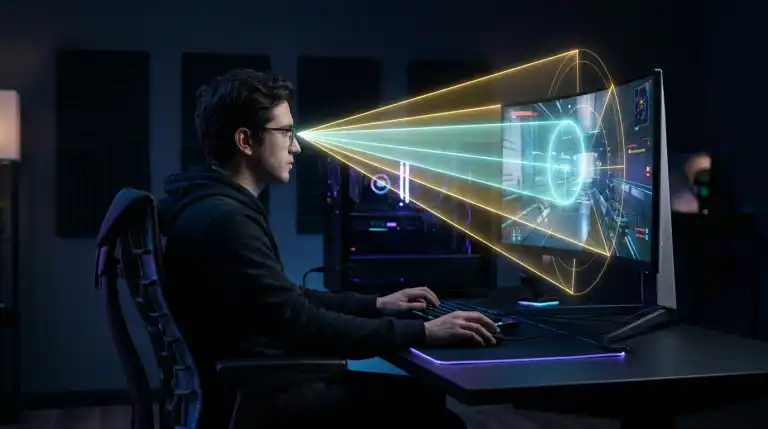
Find your ideal monitor viewing distance for gaming. Explore visual acuity limits, SMPTE and THX field of view angles, and prevent digital eye strain.
When optimizing a PC gaming battlestation, players invest thousands of dollars into high-refresh monitors, mechanical keyboards, and flagship graphics cards. Yet one critical variable is routinely neglected. Your physical monitor viewing distance governs both gaming performance and comfort. Sitting too close forces your eyes to dart across broad angles. This causes severe eye strain and slows reaction times. Sitting too far away washes out fine tactical details. Distant enemy snipers blend invisibly into background geometry.
Calculate Your Ergonomic Viewing Distance in Seconds:
Find your exact visual acuity distance and cinema field-of-view thresholds right now using our free Monitor PPI and Viewing Distance Calculator.
Monitor distance is not a matter of guesswork. It is governed by optical human physiology and cinema engineering standards. Established cinema standards define proper viewing distances. Aligning your setup with visual science unlocks sharp clarity. It optimizes peripheral awareness and eliminates gaming headaches. In this comprehensive technical guide, we break down the mathematics of human vision, compare competitive versus cinematic field of view standards, and provide an exact distance matrix across popular monitor sizes.
The Ophthalmology of Vision: The One Arcminute Rule
To understand monitor viewing distance, you must first examine how the human eye resolves fine physical detail. The human retina contains millions of photoreceptor cells (rods and cones) clustered most densely at the fovea centralis. Standard 20/20 vision resolves details down to one arcminute of visual angle. That equals one-sixtieth of a single degree.
Light points separated by less than one arcminute cannot be distinguished. The brain merges them into a single visual object. They physically merge into a single visual element. When applied to computer displays, this optical rule defines the visual acuity threshold, commonly popularized by consumer electronics as the Retina threshold.
Visual Acuity Formula:
Distance = Dot Pitch / (2 * tan(0.5 arcminute))
Simplified: Distance = Dot Pitch (in mm) * 3437.75
- At this distance or farther, individual pixels blend into a smooth, seamless image.
- Sitting closer allows the human eye to perceive individual pixel borders.
For example, a 27-inch 1080p monitor has a wide dot pitch of 0.311mm. Multiplying by the acuity constant reveals a 42-inch threshold. You must sit 42 inches away before pixels blend completely. On a 27-inch 1440p monitor with a tighter dot pitch of 0.233mm, the retina threshold occurs at 31 inches (79 centimeters). If you want to compare how resolutions scale across the 27-inch form factor, read our detailed technical analysis on 1080p vs 1440p vs 4K on a 27 Inch Monitor.
Field of View Standards: Immersion vs Competitive Awareness
Visual acuity determines when pixels become visible. Field of view measures how much peripheral space the screen occupies. Two established international cinema standards dictate optimal screen viewing angles: SMPTE and THX.
1. SMPTE Standard (30-Degree Field of View)
SMPTE recommends a 30-degree horizontal field of view. This standard suits general entertainment and competitive gaming well. At a 30-degree viewing angle, the entire monitor screen sits comfortably within your central field of vision. You can see crosshairs and mini-maps simultaneously. You process HUD information without turning your head. Competitive esports athletes favor this 30-degree angle. Quick tactical decisions require processing peripheral info instantly.
2. THX Standard (40-Degree Field of View)
The THX standard, developed by Lucasfilm, recommends a 40-degree horizontal field of view for high-impact cinematic immersion. At 40 degrees, screen edges push into your peripheral vision. This creates a deeply captivating visual experience. This distance is ideal for story-driven single-player adventures, flight simulators, and racing games like Forza Motorsport or Microsoft Flight Simulator.
Comprehensive Monitor Size and Distance Matrix
To help you calibrate your desk layout, review this reference table combining visual acuity limits with recommended ergonomic gaming distances:
| Screen Size & Resolution. | Pixel Density (PPI). | Visual Acuity Limit. | Recommended Desk Distance. |
|---|---|---|---|
| 24-Inch 1080p (FHD). | 91.79 PPI. | 37.4 Inches (95 cm). | 24 to 32 Inches (60 to 81 cm). |
| 27-Inch 1080p (FHD). | 81.59 PPI. | 42.1 Inches (107 cm). | 28 to 36 Inches (71 to 91 cm). |
| 27-Inch 1440p (QHD). | 108.79 PPI. | 31.6 Inches (80 cm). | 24 to 32 Inches (60 to 81 cm). |
| 32-Inch 1440p (QHD). | 91.79 PPI. | 37.4 Inches (95 cm). | 28 to 36 Inches (71 to 91 cm). |
| 32-Inch 4K (UHD). | 137.68 PPI. | 25.0 Inches (63 cm). | 22 to 30 Inches (56 to 76 cm). |
| 34-Inch Ultrawide (21:9). | 109.68 PPI. | 31.3 Inches (80 cm). | 26 to 34 Inches (66 to 86 cm). |
| 42-Inch 4K OLED. | 104.90 PPI. | 32.7 Inches (83 cm). | 32 to 42 Inches (81 to 107 cm). |
Combating Digital Eye Strain and Computer Vision Syndrome
Positioning your monitor at the correct physical distance is vital for ocular health. Computer Vision Syndrome (CVS) affects millions of digital workers and gamers worldwide. Symptoms include dry eyes, blurred vision, tension headaches, and neck stiffness.
Focusing closer than 20 inches contracts internal ciliary muscles forcefully. The eye strains to bend its crystalline lens. Sustaining this muscular contraction for hours induces accommodative spasm, leading to severe fatigue. Intense gaming drops human blink rates from fifteen to five per minute. This dries out the sensitive corneal surface.
To preserve long-term eye health and maintain peak gaming reflexes, follow these ergonomic practices:
- Maintain Arm Length Separation: Extend your arm forward while seated upright. Your fingertips should barely brush the screen surface. A distance of 25 to 30 inches ensures comfortable focal accommodation. It protects your eyes during long sessions.
- Position Top Bezel at Eye Level: Human eyes rest most comfortably when gazing slightly downward at an angle of 15 to 20 degrees. Keep the top bezel level with your horizontal eye line. A slight downward gaze exposes less eye surface to airflow.
- Implement the 20-20-20 Rule: Every twenty minutes, pause your gameplay or work session for twenty seconds. Gaze at an object located at least twenty feet away. This allows your ciliary muscles to relax completely, preventing chronic visual fatigue.
Panel contrast also plays a major role in eye comfort. Modern displays with self-lit pixels provide deep contrast without harsh backlight bleeding. Learn how different panel technologies compare in our guide on OLED vs Mini-LED.
Curved vs Flat Monitors: Distance Calibration
Curved gaming monitors (ranging from subtle 1800R curves to aggressive 1000R curves) alter optimal viewing distance dynamics. The letter R denotes the radius of the circle in millimeters if the curve were extended into a complete cylinder.
A 1000R curved monitor has a curvature radius of exactly 1000 millimeters (1.0 meter, or 39.4 inches). For optimal visual fidelity on a curved panel, your eyes should sit precisely at the center of that radius. Sitting one meter from a 1000R screen equalizes viewing distances. The distance to the center matches the distance to the edges. Every pixel remains equidistant from your retina. This eliminates edge distortion and reduces eye refocusing fatigue.
Multi-Monitor Setups and Ultrawide Display Geometry
Calibrating viewing distance becomes complex when managing ultrawide displays or multi-monitor battlestations. A 34-inch 21:9 ultrawide or a 49-inch 32:9 super-ultrawide spans substantial horizontal desk real estate.
When using a flat multi-monitor setup, the outer edges of secondary screens sit farther from your eyes than the center display. To maintain consistent optical focal distance, you must angle secondary displays inward toward your face. An inward angle of 30 to 45 degrees ensures that your gaze remains perpendicular to the screen surface, preventing color shifting and contrast degradation on IPS and VA panels.
On super-ultrawide monitors, display curvature is essential. An aggressive 1000R curve on a 49-inch panel wraps around your vision naturally. When sitting at the recommended distance of 35 to 39 inches, the entire horizontal span remains equidistant from your retina. This prevents lateral neck strain because eye rotation alone captures the entire panoramic display.
Esports Tactical Setups: Why Pro Players Sit Exceptionally Close
If you watch professional Counter-Strike 2, Valorant, or Rainbow Six Siege tournaments, you will notice esports players sitting extraordinarily close to their monitors. Many pros position their faces a mere 12 to 18 inches away from 24-inch screens. Why do elite players adopt this posture despite medical warnings regarding eye strain?
The answer lies in biological visual pathways. The human visual system processes information through two distinct channels: the parvocellular pathway (responsible for high-resolution central detail) and the magnocellular pathway (responsible for detecting motion in peripheral vision).
In tactical shooters, spotting an enemy helmet peeking over a distant box occupies only three or four screen pixels. By sitting 14 inches from a 24-inch monitor, the player expands those pixels across a vastly larger portion of their central fovea. Tiny enemy models appear larger, making micro-aim adjustments easier. However, this posture severely restricts peripheral vision and accelerates ciliary muscle fatigue. For non-professional gamers playing multiple hours daily, maintaining a healthy 25 to 30-inch separation preserves both visual comfort and long-term eye health.
How to Calibrate Your Desk Setup in 4 Steps
- Measure Your Desk Depth: Standard desks measure 24 to 30 inches deep. On shallow 24-inch desks, use a gas-spring monitor arm. Pushing the panel flush against the wall restores proper distance.
- Verify Scaling Settings: If you find yourself leaning forward or squinting at small text, do not pull the monitor closer to your face. Instead, open Windows display settings and increase the DPI scaling percentage.
- Check Room Ambient Lighting: Avoid gaming in pitch-black rooms. High screen contrast forces your pupils into extreme dilation. Install 6500K bias lighting behind your monitor. Gentle backlighting reduces pupil dilation strain.
- Benchmark Telemetry with Our Free Tool: Use our online PPI and viewing distance calculator to confirm your exact hardware metrics before finalizing your monitor arm positioning.
FAQs
What is the best viewing distance for a 27-inch monitor?
For a 27-inch 1440p monitor, the ideal ergonomic viewing distance is between 24 and 32 inches (60 to 81 centimeters). This distance satisfies both the 30-degree SMPTE field-of-view standard for competitive gaming and the 108 PPI visual acuity threshold.
Can sitting too close to a gaming monitor damage your eyes?
Sitting too close does not cause permanent biological damage to eye structures. However, it causes severe temporary digital eye strain, ciliary muscle fatigue, headaches, and dry eyes due to reduced blink rates.
How far should you sit from a 32-inch 4K monitor?
Because a 32-inch 4K display features high pixel density (138 PPI), individual pixels vanish at just 25 inches. For optimal field of view and comfortable posture, sit between 26 and 32 inches away from the panel.
Do professional esports players sit closer to their monitors?
Yes. Many competitive FPS professionals sit 15 to 20 inches from compact 24-inch monitors. While this produces eye strain over long periods, it maximizes peripheral pixel detection and ensures tiny enemy player models appear as large as possible on their retinas.
Key Takeaways:
- Monitor viewing distance balances visual acuity resolution with ergonomic field of view standards.
- Human 20/20 vision resolves details down to one arcminute, defining the distance at which individual pixels blend into a smooth image.
- The 30-degree SMPTE field of view provides optimal tactical awareness for competitive gaming without requiring head rotation.
- The 40-degree THX field of view delivers maximum cinematic immersion for single-player narrative titles and simulators.
- An arm-length distance of 25 to 32 inches represents the universal ergonomic baseline for standard 24-inch and 27-inch gaming monitors.
- You can calculate your exact hardware pixel density and optimal viewing distance using our free interactive browser calculator.

Abdulrehman Khalid ✓ Verified Author
Founder & Lead Hardware Analyst at TechWorthies
Abdulrehman Khalid is a technology analyst, hardware researcher, and founder of TechWorthies. With extensive hands-on experience in benchmarking computer hardware, display interfaces, and wireless communications, he specializes in high-speed bus architectures, consumer electronics diagnostics, and emerging AI robotics. His technical guides prioritize empirical lab testing, official standards verification (IEEE, VESA, JEDEC), and actionable troubleshooting for hardware enthusiasts.