
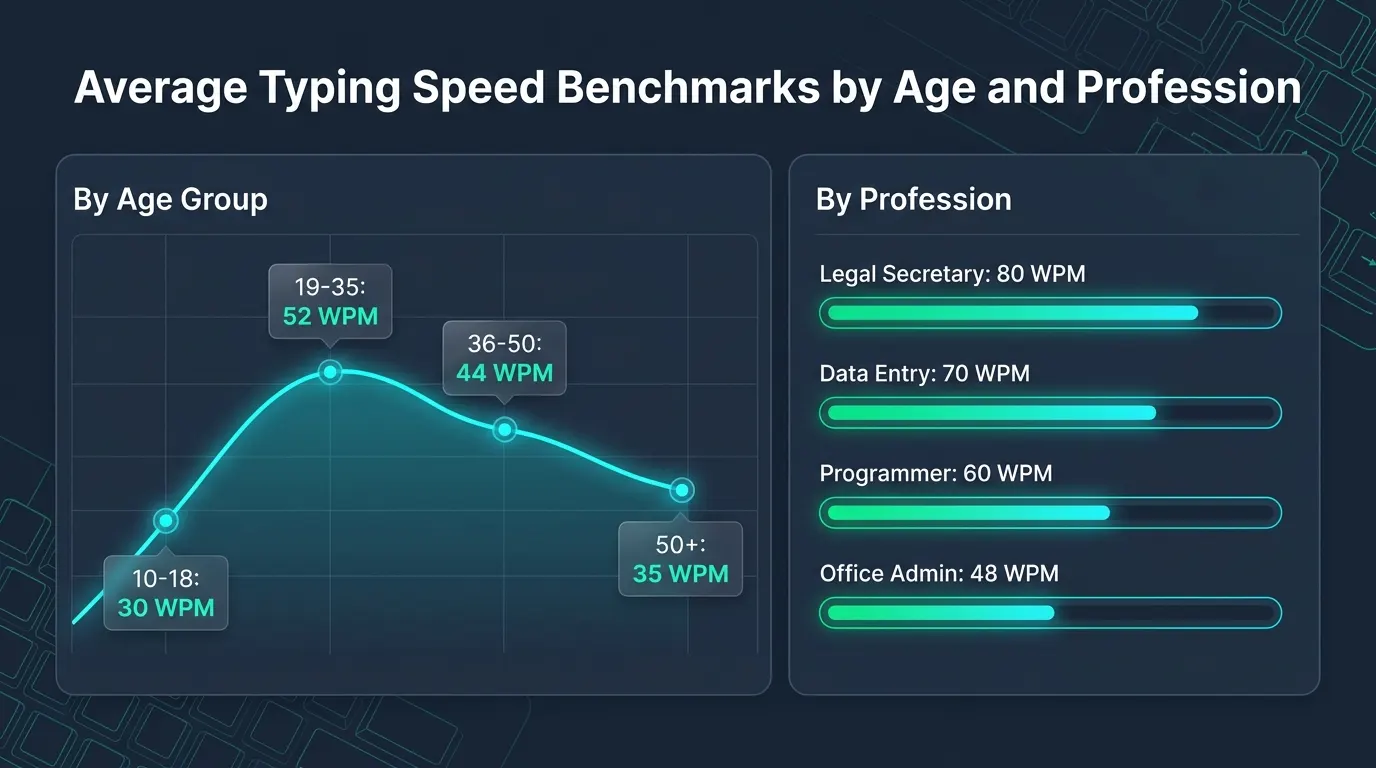
Discover average typing speed WPM benchmarks across age groups and professions. Compare your words per minute against global standards and hiring tiers.
Check Your Typing Speed: Measure your current words per minute and error rate before comparing your score. Test your performance on our free Typing Speed Test (WPM & Accuracy). You can also benchmark your rapid sprint velocity on our calibrated 1 Minute Typing Test.
Global Baseline: What Is the True Average Typing Speed?
In modern digital workplaces, keyboard fluency is as foundational as reading literacy. You draft emails, compile financial spreadsheets, and write code. Your keyboard velocity directly impacts your daily productivity. Global data reveals that the baseline average typing speed for casual adults sits between 38 and 44 words per minute (WPM). This baseline represents a keystroke cadence of roughly 190 to 220 characters per minute (CPM). It also reflects an average accuracy rate of 92 percent.
However, population averages conceal massive variations across demographics. A student texting on a smartphone exhibits unique motor habits. A legal assistant transcribing court depositions faces completely different requirements. Active computer workers who touch-type every day typically average 52 to 58 WPM. Meanwhile, specialized transcriptionists routinely exceed 80 WPM. Is your keyboard velocity competitive? You must compare your score against verified demographic and occupational benchmarks.
The Science of Typing Metrics: Gross WPM vs Net WPM vs Accuracy
Before analyzing age and industry tables, it is essential to understand how standardized keyboard assessments compute velocity. Simple software programs sometimes count literal words typed on the screen. However, words vary widely in length across the English language. Typing the word “to” requires two keypresses, while typing “characteristic” requires fourteen. Tests that count raw words penalize candidates unfairly. Someone typing technical literature would score lower than someone typing simple words.
To establish fair empirical baselines, international testing standards define one standardized word as exactly five keystrokes. This standard encompasses letters, numbers, punctuation marks, and spaces. For example, register 250 raw keystrokes in one minute. The software records exactly 50 gross words. Professional benchmarks evaluate three primary telemetry indicators:
1. Gross Words Per Minute (GWPM)
Gross speed measures raw mechanical actuation speed without considering mistakes. The mathematical formula divides your total keystrokes by five. It then normalizes the result for test duration in minutes:
While Gross WPM reflects raw finger agility, it holds little value in recruitment screenings. An employee may type 85 gross words with twelve spelling errors. However, this creates broken documents that require extensive editing.
2. Net Words Per Minute (NWPM)
Net speed reflects operational efficiency by penalizing uncorrected mistakes. Recruiters and government agencies calculate Net WPM carefully. They subtract uncorrected errors from gross output:
On a standard one-minute test, every uncorrected typo deducts one full word. This penalty reduces your final certified score. Suppose you type 60 gross words with four uncorrected errors. Your certified Net WPM drops immediately to 56. This metric enforces the principle that speed without precision delivers zero economic value.
3. Keystroke Accuracy Percentage
Accuracy represents the percentage of correct keypresses relative to the total keystrokes submitted:
Most corporate employers automatically disqualify job applicants whose accuracy drops below 95 percent. A steady typist typing 55 WPM with 99 percent accuracy is highly productive. In contrast, an erratic typist at 75 WPM with 88 percent accuracy wastes time fixing typos.
Average Typing Speed WPM by Age Group
Typing speed changes predictably throughout a human lifespan. Velocity begins slowly in early childhood. It rises through adolescence as motor skills mature. Speeds peak during early adulthood, stabilize in middle age, and gradually decline in senior years. The following table illustrates empirical benchmarks across eight age brackets. These figures draw from multi-million user telemetry datasets:
Why Typing Speed Peaks Between Ages 18 and 24
Cognitive and motor science explains why individuals in their late teens and early twenties record the highest raw typing speeds. Neuromuscular transmission times, visual tracking latency, and finger dexterity reach biological peaks during this window. Furthermore, students produce thousands of words each week. They write academic essays, complete coding coursework, and communicate online.
Gamers in this age bracket frequently display remarkable burst speed. Competitive esports players develop intense spatial familiarity with keyboard clusters. Fast reflex titles train hand dexterity daily. When testing your hardware setup for gaming responsiveness, ensuring zero input latency is critical. Test your physical hardware on our interactive Keyboard Ghosting & Key Matrix Test. This ensures multi-key combinations register cleanly without dropouts.
The Senior Demographic: Experience Over Raw Reflexes
Individuals aged 45 and older exhibit slightly slower raw keystroke frequency. However, their error rate remains remarkably low. Experienced typists make fewer erratic typos. They maintain a calm, rhythmic keystroke cadence. They rarely attempt chaotic sprints that trigger backspace cascades. Consequently, their Net WPM often rivals younger typists during actual business correspondence.
Average Typing Speed WPM by Profession and Industry
Employers across different business sectors demand vastly different typing standards. An administrative clerk managing high-speed correspondence requires high keyboard throughput. In contrast, corporate executives focus primarily on strategic decision-making. The table below outlines empirical benchmarks and minimum hiring requirements. It also highlights accuracy thresholds across primary occupational categories:
The Developer Paradox: Why Programmers Type Slower Than Secretaries
Professional software engineers often record modest speeds on standardized typing tests. Most programmers average between 50 and 65 WPM. Programmers spend eight hours a day at their keyboards. However, coding does not involve continuous linear prose. Software development requires frequent cognitive pauses. Engineers must evaluate architecture, debug logic, and inspect memory allocation.
Furthermore, programming languages demand heavy usage of special syntax. Code relies on brackets, semicolons, hyphens, and numerical operators. These characters reside on the outer edges of the keyboard or require Shift key combinations. When tested on conversational English prose, a developer may type at 60 WPM. However, when writing Python, C++, or JavaScript, their real-world velocity drops to 35 WPM due to syntactic density.
Legal and Medical Standards: Zero Tolerance for Keystroke Errors
Legal secretaries, paralegals, and medical transcriptionists operate under the strictest keyboarding standards in the private sector. In these fields, precision is mandatory. A single mistyped character can alter a legal contract or compromise a patient medical chart. As a result, hiring exams in these industries impose severe point deductions for uncorrected mistakes. Top legal firms require exceptional output. Typing at 75 WPM with 99 percent accuracy is standard practice.
Typing Speed Skill Tiers: Where Do You Rank?
To contextualize your score against global percentiles, standardized typing tests categorize results into distinct performance tiers:
Characterized by the hunt-and-peck technique using two to four fingers. Typists glance back and forth between the keyboard and the screen. This constant interruption slows reading and increases typos. This cognitive interruption slows reading comprehension and causes frequent typos.
Represents the global average for typical computer users. Typists possess partial muscle memory for primary letter keys but still look down for numbers and symbols. Adequate for personal web browsing, social media, and casual office emails.
The standard benchmark for digital office employment. Typists utilize full touch typing across all eight fingers on the home row. Eyes remain fixed on the screen while hands execute words automatically through muscle memory.
Top 10 percent of all keyboard users. Typists compose ideas as quickly as they form in their minds. Typing feels effortless and natural. Required for demanding roles such as legal transcription, live journalism, and executive administration.
Top 1 percent of typists globally. Typists register flawless keystroke cadence on standard QWERTY keyboards with zero hesitation. Common among competitive typists, specialized transcribers, and high-level esports competitors.
The absolute peak of human keyboard velocity. Elite keyboard athletes (such as Sean Wrona and Barbara Blackburn) have demonstrated sustained speeds exceeding 160 to 200 WPM on QWERTY and Dvorak layouts during competition sprints.
Touch Typing vs Hunt-and-Peck: The Velocity Ceiling
The single greatest factor determining your typing speed is your physical technique. Computer users fundamentally fall into two mechanical categories: sight typists and touch typists.
Sight typing (frequently called the hunt-and-peck method) relies on visual guidance. Typists look at their hands and locate the target key. They strike it with an index finger and glance up at the monitor to confirm registration. Your brain must constantly alternate focus between visual tracking and composition. As a result, sight typists hit a hard biological ceiling between 35 and 45 WPM. No matter how frantically you move two fingers, visual latency prevents you from reaching higher tiers.
In contrast, touch typing relies entirely on tactile muscle memory. Each of your ten fingers is assigned specific columns anchored around the home row keys (ASDF for the left hand, JKL; for the right hand). Raised bumps on the F and J keys provide immediate tactile orientation. Typists find home position without glancing down. Your eyes remain permanently on the screen. Consequently, your brain processes words as unified motor chunks rather than isolated letters. Touch typists easily surpass 60 WPM because finger movement occurs unconsciously.
Hardware Impact: How Keyboards Influence Your Score
While mechanical technique accounts for 85 percent of typing success, keyboard hardware significantly affects finger fatigue and switch actuation speed. When testing your typing speed, using an improper keyboard can reduce your score by 5 to 10 WPM.
1. Mechanical vs Membrane Rubber Domes
Standard budget keyboards utilize rubber dome membrane sheets beneath the keycaps. To register a keystroke on a membrane board, you must bottom out the key. The rubber dome must collapse completely against the underlying circuit. This bottoming-out requirement increases finger impact stress and slows finger return speed.
In contrast, mechanical keyboards utilize independent mechanical switches beneath every keycap. Mechanical switches (such as Cherry MX Red, Brown, or Blue variants) actuate approximately halfway through their total physical travel distance (typically 1.8mm to 2.0mm). Typists can register keystrokes with a light, floating touch without slamming keys to the backplate. This reduced travel distance significantly increases typing velocity. It also helps prevent repetitive strain injury (RSI).
2. Laptop Scissor Switches
Modern low-profile laptop keyboards (such as Apple Magic Keyboards and ThinkPad scissor-switch boards) offer very short total travel (1.0mm to 1.5mm). Many fast typists achieve exceptional burst speeds on scissor switches because finger elevation between keystrokes is minimal. However, long sessions on ultra-thin keyboards can cause joint soreness due to repeated bottoming out on rigid metal frames.
Five Actionable Steps to Increase Your Typing Speed by 20 WPM
If your current benchmark falls into the 30 to 45 WPM range, you can systematically improve your velocity into the professional 60+ WPM tier. Follow this structured five-step training program:
1. Eliminate the Visual Habit
Place a small cloth or piece of paper over your hands while practicing. Forcing your fingers to locate keys purely through spatial touch accelerates neuromuscular memory formation. You will make errors initially, but within seven days, your brain will map key positions instinctively.
2. Prioritize Accuracy Before Speed
A common mistake among beginners is trying to type faster than their fingers can accurately coordinate. When you make a typo, you waste three to four seconds deleting characters and retyping the word. Practice at a deliberate, slow rhythm where you maintain 98 percent accuracy. Speed will naturally emerge once your keystroke trajectory is clean.
3. Practice Common Bigrams and Trigrams
The English language relies heavily on repeating letter pairs (bigrams like “th”, “er”, “on”, “an”) and three-letter sequences (trigrams like “the”, “ing”, “and”, “ion”). Rather than practicing random words, practice rolling your fingers through these common phonetic combinations in single fluid motions.
4. Optimize Your Ergonomic Posture
Maintain your elbows at a clean 90-degree angle. Keep your wrists elevated slightly above the desk surface rather than resting them on the table edge. Resting wrists while typing bends your hand backwards, compressing the carpal tunnel and restricting tendon mobility.
5. Run Daily Calibrated 1-Minute Sprints
Dedicate ten to fifteen minutes every day to timed benchmark tests. Short sprints prevent fatigue while reinforcing rapid muscle memory. You can benchmark your daily progress on our interactive Online Typing Speed Test to monitor your net velocity curve over time.
FAQs
What is considered a good typing speed for an adult?
A score between 50 and 60 Net WPM is considered good for general office workers and knowledge professionals. Anything above 65 WPM places you in the top 15 percent of keyboard users globally. For specialized roles like legal or medical transcription, employers look for 70 to 80 WPM with at least 98 percent accuracy.
Why does typing speed decrease as people get older?
Natural biological aging causes gradual reductions in nerve conduction velocity, joint flexibility, and rapid reflexes. However, experienced older typists often compensate for slower reflexes with superior rhythm and lower error rates, maintaining excellent net productivity on real-world office tasks.
How is typing speed measured on corporate employment exams?
Hiring exams almost universally measure Net Words Per Minute (NWPM). Five total keystrokes equal one standardized word. Uncorrected errors are subtracted from your gross word score over a timed one-minute, three-minute, or five-minute test window. Candidates with accuracy scores below 95 percent are typically disqualified.
Can hunt-and-peck typists type as fast as touch typists?
No. While skilled sight typists can reach 40 to 48 WPM with extreme effort, they hit a biological ceiling caused by visual latency. Touch typists bypass visual checking by using tactile muscle memory across all ten fingers, enabling consistent speeds of 70 to 100+ WPM.
Do mechanical keyboards actually make you type faster?
Yes. Mechanical switches actuate midway through key travel, eliminating the need to bottom out keys against a rigid backplate. This earlier registration reduces finger fatigue, shortens keystroke reset cycles, and allows typists to sustain higher speeds during long typing sessions.
Key Takeaways:
- Your typing speed is not a fixed trait; it is a trainable motor skill that directly determines your digital efficiency. Across the global population, the average adult types between 38 and 44 WPM, while experienced knowledge workers average 52 to 58 WPM. Professional occupations such as legal administration, medical transcription, and data entry demand speeds between 65 and 85 WPM with strict 98 percent accuracy thresholds.
- Reaching the upper performance tiers requires moving past the hunt-and-peck visual ceiling and mastering touch typing on the home row. By maintaining proper ergonomic posture, training on responsive mechanical or scissor switches, and prioritizing accuracy over chaotic speed, you can steadily increase your keyboard throughput by 15 to 25 WPM within a month of dedicated practice.

Abdulrehman Khalid ✓ Verified Author
Founder & Lead Hardware Analyst at TechWorthies
Abdulrehman Khalid is a technology analyst, hardware researcher, and founder of TechWorthies. With extensive hands-on experience in benchmarking computer hardware, display interfaces, and wireless communications, he specializes in high-speed bus architectures, consumer electronics diagnostics, and emerging AI robotics. His technical guides prioritize empirical lab testing, official standards verification (IEEE, VESA, JEDEC), and actionable troubleshooting for hardware enthusiasts.