NFC card emulation vs reader mode explained. Compare how each works, their uses, security, and smartphone compatibility.
NFC card emulation vs reader mode refers to two different ways smartphones use near-field communication (NFC) to interact with other devices. In card emulation mode, your phone acts like a compatible contactless card for payments, public transportation, or building access. In contrast, NFC reader mode allows your phone to detect and read information from compatible NFC tags, such as smart labels and programmed stickers.
Understanding these NFC operating modes helps you choose the right feature for your needs. This guide explains their key differences, practical uses, security considerations, and smartphone compatibility. Explore more gadgets to learn about useful technology and devices.
What Is NFC Card Emulation Mode?
NFC card emulation is a mode in which a compatible device behaves favor a contactless card when presented to an NFC reader. Instead of carrying a separate physical card, you can use a supported phone or wearable to communicate with a compatible terminal.
The terminal initiates the exchange, and the phone responds according to the supported card protocol and application. This allows compatible mobile devices to work with existing systems designed for contactless cards.
How NFC Card Emulation Works
A typical card- emulation interaction involves three parts:
- NFC reader: A payment terminal, transit gate, or compatible access- control reader initiates communication.
- NFC- enabled device: The phone responds as a supported contactless card or credential.
- Application or credential system: The relevant software or secure component processes the exchange according to the system’s requirements.
The exact process depends on the implementation. Some systems use a Secure Element, while others use Host- based Card Emulation( HCE). The reader and the phone must support compatible protocols and application behavior for the interaction to succeed.
Common Uses of NFC Card Emulation
Card emulation is useful when a device needs to present a digital credential to an external reader.
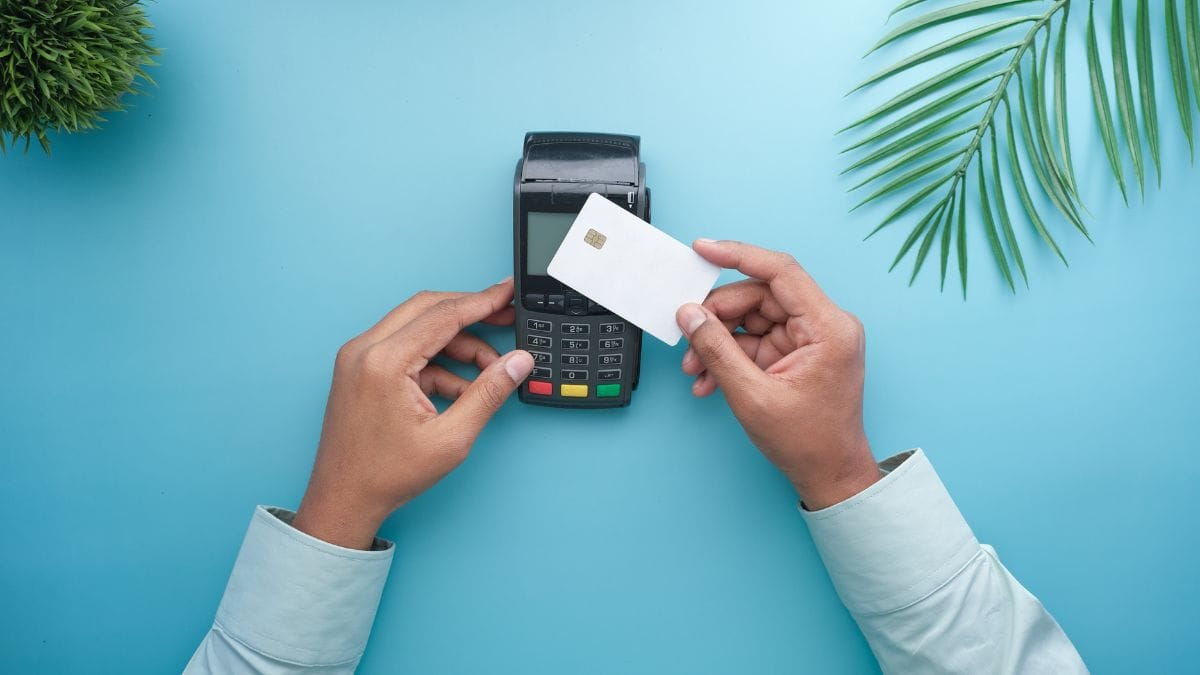
- Contactless payments: Pay with a supported mobile wallet at a compatible payment terminal.
- Building access: Use an officially supported mobile credential to enter a workplace or building.
- Loyalty programs: Present a compatible digital loyalty credential.
- Digital identification: Use supported credentials where the issuing organization and device platform permit it.
Not every card can be added to a phone. The card issuer, phone, operating system, wallet, and receiving system may all impose compatibility requirements.
HCE vs. Secure Element
Host- based Card Emulation and Secure Element- based emulation are two approaches to implementing card emulation. They are related, but they are not the same thing.
Host- based Card Emulation( HCE)
HCE routes supported card- protocol communication to the device’s host system, where an application service handles the relevant commands. Android provides APIs for developers to build HCE services for compatible readers and protocols.
A Secure Element is a dedicated secure component that can store or process credentials and handle card communication. Depending on the device, it may be embedded in the device or provided through a supported SIM- based implementation.
The practical distinction is that HCE describes host- based card emulation, while a Secure Element is a separate secure environment. Neither term means that every physical card can be copied or that a phone automatically supports every credential.
What Is NFC Reader/ Writer Mode?
NFC reader/ writer mode lets a phone or other compatible device communicate with supported NFC tags. The device acts as the reader, and the tag provides data or responds to supported commands.
NFC tags are negligible electronic components that can store information such as a web address, contact details, or other data. Some tags support only simple read operations, while others allow writing or have more advanced capabilities. The available operations depend on the tag’s technology, configuration, and the software using it.
How NFC Reader Mode Works
In a typical tag- reading interaction:
- You bring the NFC- enabled phone close to a compatible tag.
- The phone detects the tag and establishes communication.
- The operating system or app identifies the tag technology.
- The app reads the supported data or, if permitted and supported, writes data to the tag.
Many NFC applications use NDEF( NFC Data Exchange Format), a standard format for storing and exchanging data such as URLs and text. However, not every NFC tag uses NDEF. Some require technology- specific commands or a custom protocol implemented by the application.
One important technical distinction is that NFC reader/ writer mode is a general operating mode, whereas Android Reader Mode is also the name of a specific developer API.
On Android, developers can use NfcAdapter.enableReaderMode() to configure an activity to operate as a tag reader while it is in the foreground. This API has behavior that differs from other ways of receiving NFC tag events.
Common Uses of NFC Reader/ Writer Mode
Reader/ writer mode is useful whenever a device needs to retrieve information from a tag or update supported tag data.
- Opening websites: Scan a programmed sticker to visit a product page or online resource.
- Sharing contact information: Read a tag containing supported contact details.
- Reading product information: Retrieve information stored on an NFC- enabled product or label.
- Programming tags: Write a URL or other supported information to a writable tag.
- Checking compatible cards: Use an appropriate app to read supported information from certain transit cards or other contactless products.
- Custom business applications: Use compatible tags for product identification, device setup, or inventory workflows.
The phone does not necessarily have permission to read every field on every card. Some tags require authentication, and some use proprietary or specialized protocols that ordinary tag- reading apps cannot handle.
NFC Reader Mode vs. Foreground Dispatch on Android
For Android developers, Reader Mode and foreground dispatch are two different ways of prioritizing NFC tag handling.
| Feature | Reader Mode | Foreground dispatch |
| Main purpose | Dedicated tag- reading activity | Deliver matching NFC tag events to a foreground activity |
| How tags are delivered | Through a reader callback | Through Android intent dispatch |
| Best suited for | Apps centered on scanning or communicating with tags | Apps that need NFC occasionally alongside other functions |
| Reader configuration | Can select supported technologies and reader flags | Uses intent filters and foreground dispatch configuration |
| Card emulation behavior | Android’s reader- mode API disables card- emulation modes on the adapter while active | Does not impose the same reader- only operating restriction |
The key point is that these are Android app- development mechanisms, not two separate types of NFC cards. Choose the approach based on how your application needs to detect and handle tags.
NFC Card Emulation vs Reader Mode: Main Differences
The easiest way to understand NFC card emulation vs reader mode is to look at which device initiates the interaction and what each device is trying to accomplish.
Side- by- Side Comparison
| Feature | NFC card emulation | NFC reader/ writer mode |
| Main purpose | Make a device behave appreciate a compatible contactless card | Read or write supported NFC tags |
| Role of the phone | Presents a card or credential | Acts as a reader |
| Typical example | Tapping a phone at a payment terminal | Scanning an NFC sticker |
| Communication initiation | An external reader initiates the card interaction | The phone operates as the reader and detects a tag |
| Common applications | Mobile payments, supported transit passes, access credentials | Tag reading, tag programming, retrieving stored information |
| Data handling | Follows the supported card protocol and application | Reads or writes supported tag data or exchanges protocol- specific commands |
| Technical requirements | Compatible card- emulation implementation, credentials, and reader | Compatible NFC hardware, tag technology, and software |
| Security considerations | Credential protection, authentication, and transaction controls | Tag permissions, data validation, and authentication where applicable |
| Main limitation | Not every card or credential can be emulated | Not every tag or card can be read or written by every phone or app |
This comparison reflects the general NFC operating modes. Actual capabilities vary by device, application, tag type, and service provider.
Which NFC Mode Should You Use?
Your intended task determines which mode is appropriate.
Choose card emulation if you desire to:
- Pay using a supported mobile wallet.
- Present an officially supported digital transit pass.
- Use a supported mobile building- access credential.
- Build an application that presents a compatible card interface to a reader.
Choose reader/ writer mode if you desire to:
- Scan an NFC sticker to open a website.
- Read information from a supported tag.
- Write data to a compatible writable tag.
- Develop an application that communicates with NFC tags.
For example, imagine you require to use your phone at an office entrance. If the building supports a mobile access credential, you need the supported card- emulation feature. If you want to scan a tag on office equipment to display its maintenance information, you need reader functionality.
These modes are designed for different roles. However, a device may support both, and an Android app using the specific Reader Mode API can temporarily disable card emulation while that mode is active.
Android vs. iPhone NFC Support
NFC features depend on the phone’s hardware, operating system, APIs, applications, and the service you aspire to use. Android and iPhone can both support NFC- related functions, but their available features and developer interfaces are not identical.
NFC Card Emulation on Android
Android supports card emulation through implementations such as HCE, which allows compatible applications to communicate with external NFC readers using supported protocols. Android also supports card emulation through compatible Secure Element implementations.
Whether you can use a particular digital card depends on several factors:
- Whether the phone supports the required NFC functionality.
- Whether the app implements the required card protocol.
- Whether the card issuer supports mobile credentials.
- Whether the reader accepts the credential being presented.
- Whether the operating system and security settings permit the interaction.
For example, an Android phone may support HCE but still be unable to emulate a particular office badge. The badge may use a different protocol, require cryptographic authentication, or depend on a credential system that does not permit third- party emulation.
NFC Reader Mode on Android
Android provides APIs for reading NFC tags and communicating with supported tag technologies. Applications can use standard NDEF handling for compatible tags or work with lower- level protocols when the use case requires it.
If you’re choosing a phone for NFC development, check whether it supports the tag technologies and protocols your application needs. The presence of NFC hardware alone does not guarantee that every tag type or custom protocol will work.
Developers should also understand the distinction between Android’s general NFC tag- handling framework and its specific Reader Mode API. The latter places the NFC adapter into a reader- only operating situation while the associated activity is in the foreground.
NFC Tag Reading and Card Features on iPhone
Apple provides NFC functionality to supported apps through frameworks such as Core NFC. Core NFC supports reading compatible NFC tags and interacting with supported tag technologies, subject to the relevant device, software, and API requirements.
However, being able to read NFC tags on an iPhone does not mean an app can emulate any contactless card. Card emulation and digital credential capabilities have separate requirements and may be limited to supported system features, applications, regions, or credential providers.
Before buying a phone or developing an app, verify support for the exact NFC task you aspire to perform rather than relying on a general NFC specification.
NFC Security, Compatibility, and Common Problems
NFC operates over a short distance, but short range alone does not guarantee security. The security of a particular implementation depends on how it authenticates devices, protects credentials, validates data, and handles access.
Is NFC Card Emulation More Secure Than Reader Mode?
Neither mode is inherently more secure in every situation. They perform different tasks, so security depends on the application and its implementation.
With card emulation, important considerations include:
- How credentials are stored and protected.
- Whether the system authenticates the reader and the credential appropriately.
- Whether sensitive transactions use suitable cryptographic protections.
- Whether the card issuer or service provider controls credential provisioning and revocation.
With reader/ writer mode, important considerations include:
- Whether data read from a tag is trusted.
- Whether the application validates URLs, commands, and other input.
- Whether writing to the tag requires authentication or authorization.
- Whether the app handles potentially malicious or misleading tag content safely.
For example, an NFC tag may contain a URL that looks legitimate but redirects to a fraudulent website. Reading the tag does not make the destination trustworthy. Similarly, presenting a phone to a reader does not guarantee that the reader or the transaction is legitimate.
Android’s HCE documentation explains how card communication can be handled by the host system or routed to a Secure Element. These implementation choices affect the architecture, but security still depends on the complete system.
Why Can’t I Copy My NFC Access Card to My Phone?
An NFC reader app may be able to detect a card or read some information from it without being able to reproduce the card’s functionality.
Some access cards contain publicly readable information, while others use authentication, cryptographic operations, proprietary protocols, or protected credentials. A phone must also support the appropriate emulation method, and the access- control system must recognize the resulting credential.
Copying data is therefore not the same as creating a working duplicate of a card.
If you require to use your phone to enter a building, ask the building manager or access- control provider whether it offers an official mobile credential. This is generally the most reliable route for supported access systems.
Why Is My Phone Not Reading an NFC Tag?
If your phone fails to read a tag, check the following:
- Confirm NFC support: Make guaranteed your phone supports NFC and that the feature is enabled where applicable.
- Reposition the phone: Relocate the phone slowly around the tag because the NFC antenna location varies by device.
- Check tag compatibility: The tag may use a technology or protocol that the phone or app does not support.
- Check the tag’s condition: A damaged tag or a tag that has been incorrectly programmed may not work as expected.
- Strive a suitable app: Some tags require an application that understands their format or commands.
- Check permissions and settings: Make guaranteed the app has the required permissions and that the phone’s operating system supports the requested operation.
Remember that reading a tag and writing to it are different operations. A tag may be readable but not writable, or it may require authentication before changes can be made.
Does Android Reader Mode Disable Card Emulation?
Yes, when using Android’s specific NfcAdapter.enableReaderMode() API, the NFC adapter operates in reader- only mode while the associated activity is in the foreground. Android’s API documentation states that this disables card- emulation and peer- to- peer modes on that adapter during that period.
This behavior should not be generalized to every NFC reader application, every operating system, or every NFC interaction. It is a specific behavior of the Android Reader Mode API.
When developing an Android application, review the official NfcAdapter API reference and select the appropriate approach for your use case.
FAQs
What is NFC reader mode?
NFC reader mode allows a smartphone to detect and communicate with compatible NFC tags or cards to read their stored data.
What is NFC emulation?
NFC card emulation lets a smartphone act like a compatible contactless card, such as a payment card, transit pass, or digital access card.
What does “NFC card reader” mean?
An NFC card reader is a device that uses near-field communication to read information from compatible contactless cards, tags, or smartphones.
Should I turn NFC on or off?
Keep NFC on if you use contactless payments, digital access cards, or NFC tags. Turn it off when you do not need these features.
What happens if I disable NFC?
Your phone will stop using NFC for functions such as contactless payments and tag scanning, but Wi-Fi, Bluetooth, and regular mobile functions will continue working.
Key Takings:
- The main difference between NFC card emulation vs reader mode is the role your phone plays during communication.
- Card emulation: Your phone acts like a compatible contactless card, such as when you pay with a supported mobile wallet.
- Reader/writer mode: Your phone reads or writes supported NFC tags, such as when you scan a sticker to open a website.
- Both modes are useful, but neither guarantees compatibility with every NFC card, tag, or reader. Before choosing a device or developing an NFC application, check the required protocols, credential support, operating-system features, and security requirements.
- For most users, the decision is simple: use card emulation to present a supported digital credential, and use reader/writer mode to interact with supported NFC tags.
Additional Resources:
- How Host-based Card Emulation (HCE) works on Android: Explains Android card emulation and how HCE works.